• Posted by Swen 13.02.2010 2 Comments

    The recent blog post "Machine Learning in Mordor" is an excellent example of inherent bias in error estimation methods. Let us consider a standard classification task for simplicity. Then a good machine learning practice is first to find a classifier that is optimal or near-optimal on the training set. Recall that for a fixed classifier the training error is a Monte-Carlo estimate of the generalisation error - the average error that the classifier makes if the data is drawn independently from some unknown but fixed distribution. However, as soon as we choose to minimise the training error, the estimate becomes biased. The training error underestimates the generalisation error.

    To avoid this the data is usually split into two separate sets: training data and validation data. If we choose the classifier according to the training data and later estimate the generalisation error on the validation data, the bias disappears and we should be in good shape. Moreover for certain classification methods, such as Support Vector Machines, it is possible to prove that the training error and the generalisation error are closely connected. That is, we can prove formulae

    GeneralisationError <= TrainingError + F(n)

    where F(n) is a bias term that depends on size of the training sample. Although both of these arguments are formally correct, they are actually void in certain practical settings.

    For instance, student Bughrorc who split the data into a 15 element training and 5 element test set did not do anything wrong, but yet his classification algorithm is likely to perform inferior to the method proposed by Aghargh.

    One could argue that Bughrorc made a mistake and used the validation set for choosing between several competing classifiers and thus, for the same reasoning as explained above, the estimate on the generalisation error is now an underestimation. However, this is only a partial explanation.

    Imagine a standard no-free-lunch setting, where the labels to the data are assigned randomly so that 80% spells are good and 20% of the spells are bad. Moreover, assume that Bughrorc chooses only one classification algorithm on the training set and later uses the validation set for estimating the generalisation error. As the sample is small, the validation error might be zero again. Is the estimate free of bias now and is Bughrorc safe?

    Actually not. As weird as it seems, statistical estimates depend on your intention and potential behaviour. If Bughrorc sees a small error estimate and accepts it as a correct one, it does not mean that this is unbiased eventhough the validation was properly done. To verify whether the estimate is biased or not, Bughrorc has to explore his deeper thoughts. If he can solemnly promise that a larger validation error would not had discouraged him to drop the experiment, then the validation error is indeed unbiased (but wrong). However, if a larger validation error would have stopped him from using the classifier, the same result is biased (and wrong) - whenever Bughrorc accepts the validation error it is necessarily small and thus the validation error actually underestimates the generalisation error.

    As most of us are sane enough not to use a classifier with an estimated classification error near 100% or even near 50%, the validation error is biased for all practical purposes.

    Surprisingly enough this bias can be estimated. Let us first fix a conservative point estimate for the validation error that is smaller than the actual generalisation error on at most 5% cases, if the validation samples are independently from the actual distribution. For example, assume that we are willing to accept the 20% classification error and the classification problem is easy - for a randomly drawn sample, the validation error is below 20 with probability 95%. Now even though we shall tend to unfairly reject all cases where the validation error overestimates the generalisation error (thus biasing our estimate towards underestimation), the fraction of such cases is at most 5/95=5.3%. Consequently, the estimate is a safe overestimate with confidence 94.7%.
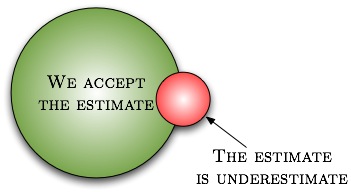
    Easy machine learning problem

    Easy machine learning problem

    On the other hand, if the classification problem is difficult, say, the validation error is below 20% with probability 4%, then the situation is completely different. Since the fraction of cases where the validation fails is larger than the fraction of cases we accept the estimate, all cases where we accept the estimate might be incorrect. Consequently, the estimate is a safe overestimate with confidence 0%.
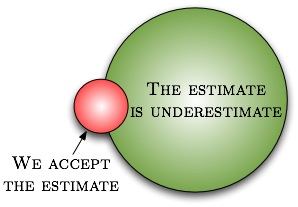
    Difficult machine learning problem

    Difficult machine learning problem

    As a final remark, note that if the validation set is small and the classification task is difficult then validation error is below accepting threshold with significant probability. For the non-free lunch Mordor case, the acceptance probability is 80% for a single point and thus we underestimate the result in 80% possible cases. If the validation set is large, then such a small error is achieved with insignificant probability and the question whether we should or should not continue does not occur "at all". In other words, the smaller is our acceptable error rate, the larger must be the validation set to compensate the rejection bias.
    Tags: , ,

  • Posted by Swen 25.08.2009 No Comments

    There seems to be a wide split of opinions between theoreticians and practitioners. Namely, some theoreticians define pseudorandomness in terms of complexity theory. As a result, the corresponding constructions are inherently slow and thus rejected by practitioners. This short blog post tries to address some common misconceptions.

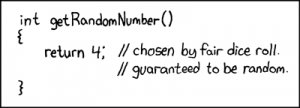
    Random number generator by xkcd

    A random number generator by xkcd

    Formally, a pseudorandom generator is a deterministic function f:\mathcal{S}\to\mathcal{R} which takes a (relatively short) seed s and converts it into an element of \mathcal{R}. In most cases, we as computer scientists are interested in functions f:\{0,1\}^n\to\{0,1\}^\ell. However, there are other reasonable domains, too. For instance, when performing Monte-Carlo integration in the region [0,1], we would be interested in the functions of type f:\{0,1\}^n\to[0,1]^\ell.

    It is important to note that any function of type f:\mathcal{S}\to\mathcal{R} is a pseudorandom generator. However, not all of those functions are equally good for all purposes. There are two main properties that are used to discriminate between various pseudorandom functions. First, we can talk about the efficiency of a pseudorandom generator, i.e., how fast can we compute f(s). Second, we can talk about the statistical properties of the output f(s).

    Before going into the details, let us establish why anyone should use pseudorandom generators at all. There is an interesting controversy in the computer science, as well in statistics. Many algorithms assume that it is possible to use uniformly distributed numbers. For example, Monte-Carlo integration is based on the law of large numbers:

        \[\Pr[\lim_n\frac{1}{N}\sum_{i=1}^N g(x_i)=\int_0^1g(x)dx] = 1\]

    whenever x_1,\ldots,x_N are taken independently and uniformly from the range [0,1]. Similarly, one can provide theoretical bounds for the randomized version of quicksort, provided that we can draw elements uniformly from a set \{1,\ldots,K\}. However, computers are mostly made of deterministic parts and it turns out to be really difficult to automatically collect uniformly distributed bits. A design of a device that would solve this problem is far from trivial.

    The first official solution to this problem was posed in 1927 when a student of Karl Pearson published a table of random numbers. Later such tables were built by the RAND Corporation. That is, the function f was explicitly specified through a big table. Of course, such a table is useful only if it can be used as a "reliable" source of random numbers. In particular, the value of

        \[\frac{1}{N}\sum_{i=1}^N g(x_i)\]

    should be as close to \int_0^1 g(x)dx as possible. Since there are infinite number of functions, we cannot actually check this condition. Instead, statisticians performed a series of tests on the table to verify that the sequence x_1,x_2,\ldots looks as close to random as possible.  If we extend this concept properly, we get the modern quantification of pseudorandomness.

    Formally, a function f:\mathcal{S}\to\mathcal{R} is a (t,\varepsilon)-secure pseudorandom generator if for any t-time algorithm A:

        \[|\Pr [r\gets\mathcal{R}: A(r)=1]-\Pr[s\gets\mathcal{S}: A(f(s))=1]|\leq \varepsilon\]

    where the probabilities are taken over the uniform choices of s and r. In more intuitive terms, if you replace the randomness r with f(s) and your algorithm runs in time t, then the switch generates no easily observable discrepancies.

    As an illustrative example, consider a probabilistic combinatorial search algorithm B that runs in time t_1 and outputs a solution that can be verified in time t_2. In this case, the use of a (t_1+t_2,\varepsilon) -secure pseudorandom generator within B instead of pure randomness would decrease the probability of B finding a solution by at most \varepsilon. Indeed, otherwise we could construct a (t_1+t_2)-time algorithm C that outputs 1, if B finds the solution and 0 otherwise, and use it to discern the pseudorandom generator from true randomness with success at least \varepsilon. This would contradict the fact that we have a true (t_1+t_2,\varepsilon) -secure pseudorandom generator.  Similar argument can be proven also for the Monte-Carlo integration algorithm. Note that parameters t and \epsilon can be arbitrary real numbers. For the combinatorial search algorithm that takes 3 weeks CPU time, you might use a (3\ \text{week}, 0.01)-secure pseudorandom generator.

    There are essentially two reasonable complaints about the pseudorandom generators. First, since obtaining random bits is hard, we have not solved the problem completely, as we must still get the seed from somewhere. This is indeed a valid problem. For instance, the standard rand() function in C is known to fail the NIST statistical test and thus you might actually observe inconsistencies when using rand() directly or generating a seed for a more complex function with rand(). The latter does not mean that rand() is not a pseudorandom generator, rather that its quality might be low for certain applications. As a complete solution, you would like to get a function f:\{1\}\to\mathcal{R}. For some tasks, such as Monte-Carlo integration of certain functions the corresponding solution is known (see multidimensional integration and sparse grids).

    However, we still do not know how to do it in general, i.e., how to convert randomized algorithms into deterministic ones without significant losses in their performance. The corresponding area of research is known as derandomization. Second, one might argue that we could prove directly that by replacing r with f(s), the performance of the algorithm does not deteriorate much. However, this is not an easy task and it is usually not a valid option for usual mortals.

    To summarize, whenever you use a certain function f to extend a random seed in your implementation you actually have to believe that it does not affect performance, i.e., f is a pseudorandom generator with appropriate (t,\varepsilon) parameter values. Whether you should use f(x)=1, rand() in C, or something more elaborate, depends on the application.

    Tags: , , ,

  • Posted by Swen 27.11.2008 4 Comments

    Note: This is again a post for sharing personal computer-taming experiences, that aims to help others who might stumble upon simialr problems. Also note, that this is a guest posting kindly presented by Swen Laur.

    Python

    We as dumb users are often hurting ourselves through ignorance. One of many such traps is Python install on Mac OS X Leopard. First, for most users a new install is completely unnecessary, since Leopard comes with pre-installed Python. However, as top Google hits kindly suggest to install MacPython, we as ignorant users follow the advice. As a result, there will be two versions of Python in the computer. Now if we install setup-tools and easy_install, spooky things start to happen — packages that are installed through easy_install are suddenly inaccessible and nothing seems to work properly.

    The explanation behind this phenomenon is simple though a bit technical. Obviously, after having installed MacPython, we have two distributions of Python in our computer:

    • /System/Library/Frameworks/Python.framework/Versions/Current/bin/
    • /Library/Frameworks/Python.framework/Versions/Current/bin/

    which are accessible from the command line through the links in the directories /usr/bin and /usr/local/bin, respectively. On installation, MacPython modifies .bash_login file so that the new path is

    /Library/Frameworks/Python.framework/Versions/Current/bin/;${PATH}
    and thus the command line invocation of python is translated to

    /Library/Frameworks/Python.framework/Versions/Current/bin/python

    which, naturally, corresponds to MacPython.

    As a second clue, note that setup-tools and easy_install packages come with Leopard's Python itself. More precisely, the corresponding command line tool is /usr/bin/easy_install. However, if you install setup-tools for your new MacPython, the corresponding binary will be  /usr/local/bin/easy_install. Now note that in the default configuration, /usr/bin goes before /usr/local/bin in the PATH variable. As a direct consequence, each invocation of easy_install puts packages to Apple Python (into the directory /Library/Python/<version>/site-packages, to be precise), and these packages are naturally not accessible by the MacPython, that you normally execute from a shell. MacPython search the packages from the directory

    /Library/Frameworks/Python.framework/Versions/<version>/lib/python2.5/site-packages.

    As a simple solution, we must change the configuration of easy_install. For that we have to change the configuration  .pydistutils.cfg located at your home directory. There should be the following lines

    [install]
    install_lib=/Library/Frameworks/Python.framework/Versions/Current/lib/python$py_version_short/site-packages/
    install_scripts =/Library/Frameworks/Python.framework/Versions/Current/bin

    The first line specifies where all Python modules should be installed and the second line specifies where all executables should be located (this directory is in the first place in the PATH and thus  MacPyton executables are the first to be executed). After that one should reinstall setuptools and easy_install.During the installation of setuptools, the program might comlain. In this case you should silence it by modifying PYTHONPATH. As a result, easy_install is located 

    /Library/Frameworks/Python.framework/Versions/Current/bin 

    and thus the packages are put into correct directory. As such, we solve the problem with easy_install but are still vulnerable to other easter-eggs coming from the fact that we do not use the Apple distribution of Python. In particular, you cannot do any user-interface related programming, since the corresponding PyObjC module is missing from non-Apple Python distributions.

    Another, more complex solution is to remove MacPython cleanly. The latter is not an easy thing to do, since package management of open-source tools is more than unsatisfactory in Mac OS X (in fact, open-source tools are often difficult to install and uninstall under many non-Linux operating systems). The situation is even worse when you have installed some other Apple packages (.mpkg files) to extend basic configuration of MacPython. In the following, we describe how to do a successful uninstall in such cases. This procedure is not for the fainthearted — if you have a time-machine copy of the system state before installing MacPython, then it might be easier to revert to this state.

    The key to successful uninstallation procedure is a basic understanding what is a package and how the Installer.app works. First, note that the package is nothing more than a directory (one can expand the contents by right-clicking the package) with the following structure

    Contents/Archive.bom
    Contents/Info.plist
    Contents/Packages/..
    Contents/PkgInfo
    Contents/Resources

    The file Info.plist provides an xml-description how to install the package. The file Archive.bom contains in semi-binary description of all files that will be copied to various install locations. The directories Packages and Resources contain sub-packages and files to be copied to the system. The installer.app reads Info.plist and Archive.bom to create necessary files and then copies the package without directories Resources to /Library/Receipts. The receipts are in principle enough to do a clean uninstall if the files are not used by other programs. Normal practice for the Apple software requires that all files should be stored in the directory
    /Applications/Installed-Application.app or in some place in /Library if the corresponding piece of software is shared by several applications. Mostly, the corresponding directories are stored in /Library/Frameworks.  The integrity of all files installed under /System during the system updates are not guaranteed and therefore sane persons do not store files there. The latter is not true for open-source software, which often tries to write into directories /usr/local/bin and /usr/bin (extremely dangerous).

    To uninstall packages, we have to first find out, where it was written. The  key IFPkgFlagDefaultLocation or IFPkgRelocatedPath in the Info.plist contains the default or actual installation directory. With the command line tool lsbom we can also see the list of all files and directories that where installed. To be precise, the lsbom gives out relative paths with respect to install directory.

    Now applying this knowledge, we can deduce that MacPython consists of five packages, which create a directory /Library/Frameworks/Python.framework
    and write the following files

    idle
    idle2.5
    pydoc
    pydoc2.5
    python
    python-config
    python2.5
    python2.5-config
    pythonw
    pythonw2.5
    smtpd.py
    smtpd2.5.py

    to the directory /usr/local/bin in addition to /Application/MacPython <>. Hence, if we remove these files, we restore the initial state unless we installed some other packages. In this case the procedure can be more tedious.

    Finally, we should restore the old ~/.bash_login from the file ~/.bash_login.pysave.

    To summarize, uninstallation of packages is more difficult than application-bundles (yet nevertheless, it is not hopeless). But still, I think applications without installers are the way to go.

    Important update: How to install scypy from source code

    Scipy is a nice extension of Python that provides the power of Matlab functions. By some odd reasons the maintainers of scipy package suggest to install non-Apple distribution of Python. In other words, they force you to abandon PyObjC library that is a core graphical library on Mac OS X. Fortunately,  it is still possible to have both by installing scipy package from the source. There are some hiccups in the procedure but in general it is doable

    1. Install unfpack thogether with UFconfig and AMD libraries from the source
      1. Download source files from the url http://www.cise.ufl.edu/research/sparse/umfpack/
      2. Change the configuration file UFconfig according your computer. Flag
         
        UMFPACK_CONFIG = -DNBLAS  

        is a safe though a bit slow choice 

      3. Run make and pray
      4. Copy libumfpack.a  and libamd.a
      5. to /usr/local/lib

      6. Copy all files from Include directories of UMPACK, UFconfig and AMD:
        umfpack*.h
        UFconfig.h
        amd.h
        amd_internal.h
    2. Download and install numpy and scipy packages. You might change the compilation target by by typing the following commandexport MACOSX_DEPLOYMENT_TARGET=10.4in the shell before compiling and installing. The target value 10.5 is not good choice, since it automatically creates compile problems (joys of using freeware). Note that the current tarball scipy-0.7.0b1 is incomplete (joys of using freeware) and thus you have to use svn trunc for that. But otherwise, the installation guide http://www.scipy.org/Installing_SciPy/Mac_OS_X is correct.

    Important update: An update to the update

    Seems that they have now fixed the 10.5 target and you can use the command

    export MACOSX_DEPLOYMENT_TARGET=10.5

    before compiling if you have Leopard

    Tags: , ,